The Catalog API is moving to Price Hero — and v3 is here

When we first launched the Trendful Catalog API, it was built for a small group of Enterprise clients who needed programmatic access to our product database. Over time, it grew into something much bigger — powering resale intake workflows, pricing tools, and inventory systems for businesses of all sizes. We knew it deserved its own home.
Today, that home is Price Hero.
What is Price Hero?
Price Hero is a consumer application that helps owners identify their items and understand what they're worth. It's powered by our Catalog API and marks an expansion of its capabilities — beyond pricing, and beyond designer goods. We're opening it up to developers who want to try the app and build on the API.
The API has a new base URL — https://api.pricehero.ai — and a brand new developer portal at pricehero.ai/developers where you can sign up, generate API keys, and start building in minutes.
What's new in v3
The current API version is v3. Here's what changed from v2:
Three core endpoints
The v3 API ships with three endpoints covering the main resale use cases:
| Endpoint | Description |
|---|---|
POST /v3/catalog/query | Search the catalog by text query |
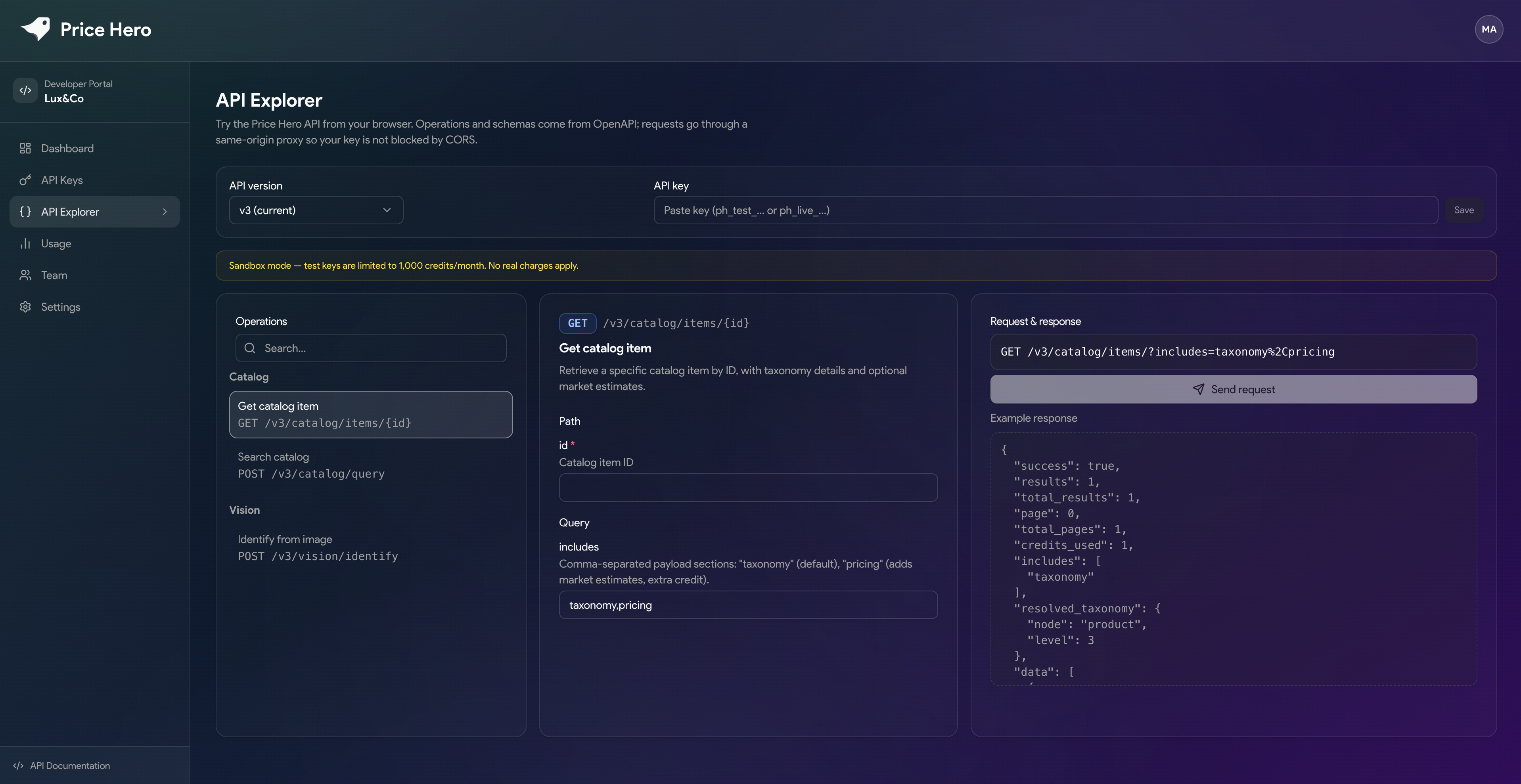
GET /v3/catalog/items/:id | Retrieve a specific catalog item with pricing |
POST /v3/vision/identify | Identify an item from a photo |
Vision identification
Submit an image of a luxury item — a handbag, watch, or accessory — and the API returns the closest catalog matches with confidence scores. This is the same technology powering visual search in our Resale App, now available to any developer building on the API.
Condition-based pricing
Every catalog item now includes condition-based fair market value estimates — automatically generated across new, excellent, good, and fair conditions. You no longer need to apply your own pricing logic on top of raw catalog data.
Taxonomy and includes
Responses support an includes parameter to pull in additional payload sections. Pass taxonomy (included by default) to get full category classification, or add pricing to include market estimates. This keeps the default response lean while giving you opt-in depth when you need it.
Sandbox mode
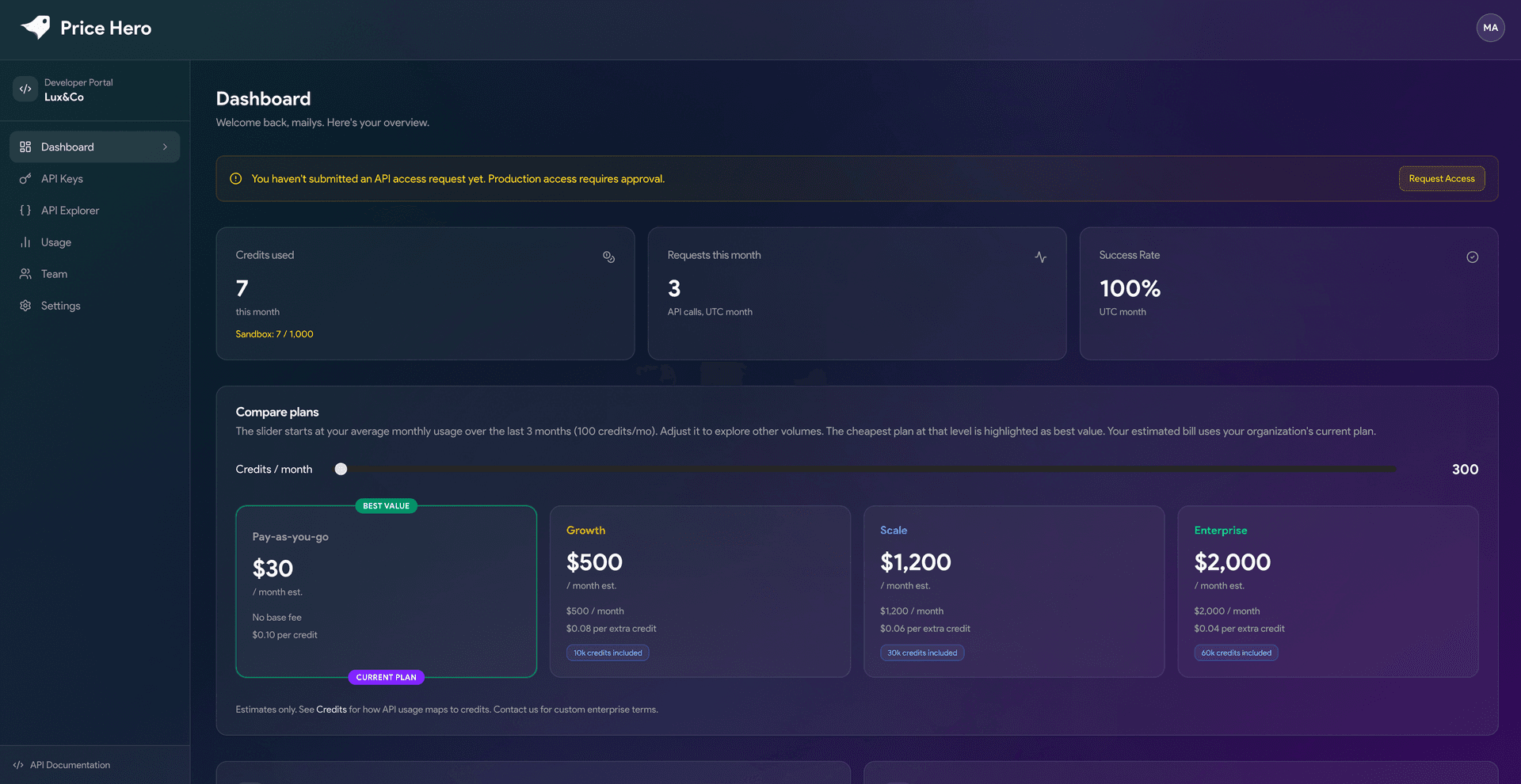
Every account starts in sandbox mode, with access to 1,000 free credits per month and no real charges. Sandbox mode is ideal for development, testing, and integration — switch to production when you're ready to go live.
The developer portal
The new portal at pricehero.ai/developers replaces the manual API key process we had before. Here's what's inside:
Dashboard — A live overview of your credit usage, request volume, and success rate for the month. A plan comparison tool lets you estimate costs at your actual usage level before committing to a plan.
API Keys — Generate and rotate sandbox and production keys directly from the dashboard. No email thread required.
API Explorer — Try every endpoint interactively in the browser. Select an operation, fill in the parameters, and send a real request against the sandbox. Responses display inline — no Postman setup needed.
Usage logs — A full request log showing timestamp, method, endpoint, API version, HTTP status, results count, credits used, and duration for each of your last 50 requests.
Team — Invite teammates to your organization, manage roles (Owner / Member), and collaborate on integrations without sharing credentials.
Credits — how pricing works
v3 uses a credit-based model. Each API request consumes a number of credits depending on the endpoint and what you include in the response.
Plans range from pay-as-you-go to Enterprise:
- Pay-as-you-go — No base fee, $0.10 per credit
- Growth — $500/month, includes 10k credits, $0.08 per extra credit
- Scale — $1,200/month, includes 30k credits, $0.06 per extra credit
- Enterprise — $2,000/month, includes 60k credits, $0.04 per extra credit
The dashboard plan slider lets you adjust your projected monthly credit usage and see which plan makes the most sense before you commit.
What about v1 and v2?
Legacy v1 and v2 clients continue to work. The Price Hero API supports all three versions simultaneously — just use /v1/, /v2/, or /v3/ in your request path. The v3 API Reference is the default in the sidebar, but you can switch to legacy versions using the version control.
If you're on Trendful v2 and want to migrate, the v2 legacy documentation is still available on the Trendful website. We recommend moving to Price Hero v3 to get access to vision identification, condition-based pricing, and the full developer portal.
Getting started
- Create your account at pricehero.ai
- Generate an API key from the Developer Dashboard
- Follow the Quickstart guide to make your first request
- Explore the full API Reference
If you have questions or want to talk through an integration, reach out at contact@trendful.com.
Keep reading
- Introducing the sell form on Launch: intake without a website
Launch plan merchants can share a link to a custom sell form so customers submit items without needing the merchant’s site. Submissions…
- Introducing Price Hero: bringing transparency to resale pricing
Powered by Trendful data, Price Hero helps consumers instantly discover the real condition-based market value of their pre-owned items —…
- Powering internal pricing tools with the Trendful Catalog API
The Trendful Catalog API isn't just for powering customer-facing resale experiences; it’s also a powerful engine for building internal…