How do I add my bank account to my admin account?
Once you log into your admin account, click on “Settings” at the bottom left-hand corner.
Next click on “Payout wallet”. Your bank account is used to fund your Trendful Wallet, and it’s in the Bank account section of that page.
Follow these simple steps to connect your bank account:
-
Click the button “Connect bank account” in the “Bank account” section.
-
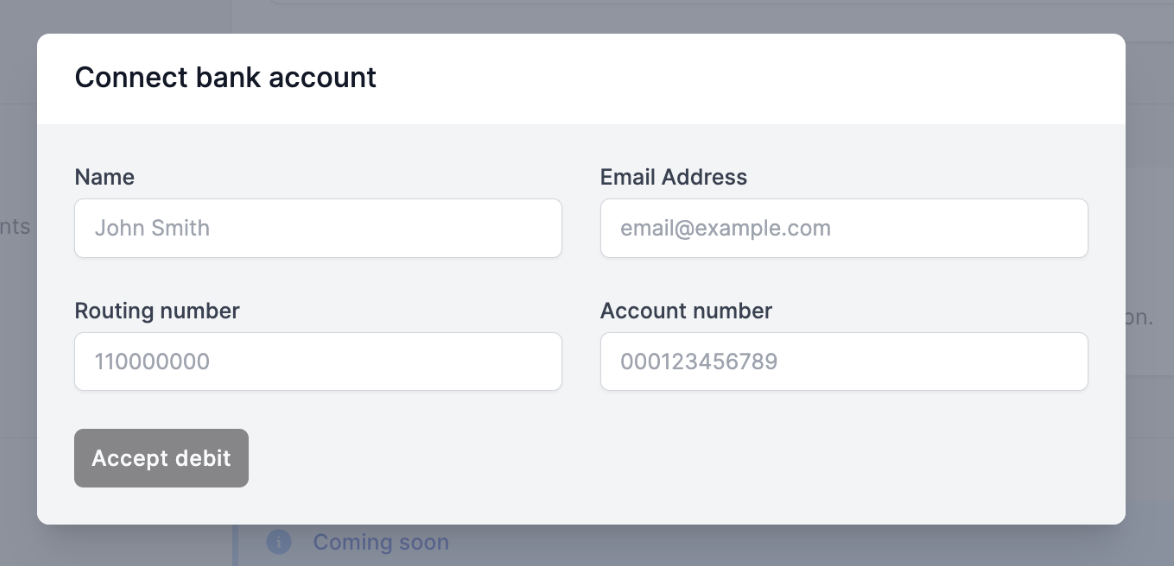
You will then be prompted to manually enter your bank account information. (see the image example below)
-
Click “Accept debit”. If asked, click Authorize bank debit to allow Trendful to debit this account to fund your wallet.
-
Your bank may need to be verified with a micro-deposit from Stripe (our payment processor). In that case, the Bank account section shows the estimated arrival date.
-
When the micro-deposit arrives, go back to Settings → Payout wallet and click “Verify with microdeposits”. Enter the code from your bank statement on the Stripe page that opens.
- Now your bank account is connected!
More about Trendful Wallet
Still stuck? Get in touch or browse all 144 answers.