How do I send an ACH payout to a customer?
Trendful partners with Stripe Payments Company for money transmission services and account services with funds held at Fifth Third Bank, N.A. and Evolve Bank and Trust, Members FDIC.
Sending a payout is simple with Trendful Wallet, just make sure your wallet is set-up and your bank account is connected before you try to send a payout.
Successfully send your first payout with these simple steps:
- On your offers overview page in your admin account, select the offer with the customer you would like to pay and then scroll down to the payout section. (see the image example below)

- Click the button “Create payout”, a window will pop-up, here you can make any last adjustments to the payout amount. You can also verify that your customer has connected their bank account. (see the image example below)
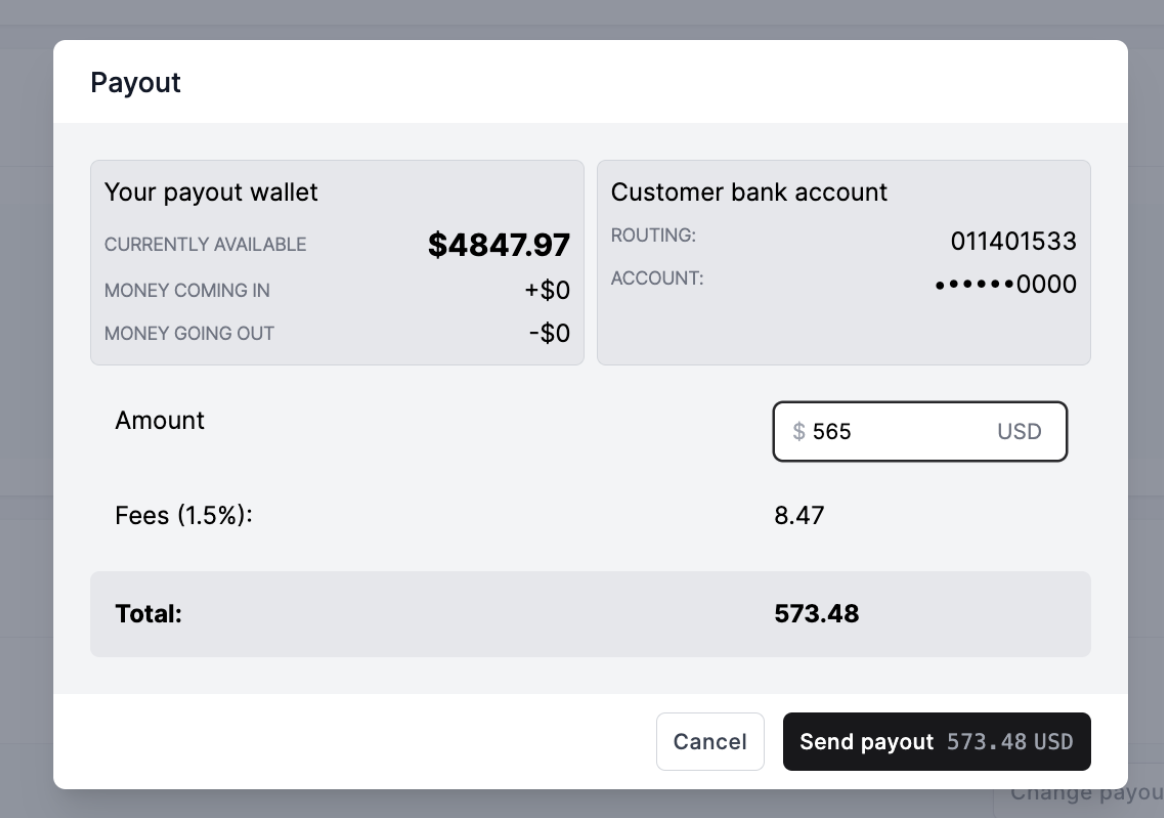
- When you are ready simply click “Send payout”. Your customer will receive an automated email notification that their payment is on the way.
*Currently Trendful Wallet and sending bank transfers to your customers is only available to companies based in the United States. However, merchants from any countries are able to connect a PayPal business account and send payouts via PayPal.
More about Trendful Wallet
Still stuck? Get in touch or browse all 144 answers.